
Download Windows 10 Firewall Control – Free, Secure Firewall Management Tool for Windows
Windows 10 Firewall Control is a powerful, free security tool developed by Sphinx Software, designed to give users full control over their Windows 10 firewall settings. Unlike the default Windows Firewall interface, which can be confusing and limited, this software offers an intuitive, streamlined dashboard that allows both beginners and advanced users to manage incoming and outgoing network traffic with precision. Whether you're protecting sensitive data, blocking unwanted connections, or monitoring suspicious activity, Windows 10 Firewall Control provides the visibility and control you need.
With its lightweight design, the tool runs efficiently in the background without slowing down your system. Regular updates ensure compatibility with the latest Windows 10 versions and emerging threats, making it a reliable long-term security solution. Perfect for home users, remote workers, and IT professionals, this app enhances your digital privacy and strengthens your system’s defenses.
Download Windows 10 Firewall Control today and take full command of your network security with a simple, secure, and effective tool.
Key Features of Windows 10 Firewall Control
Windows 10 Firewall Control stands out in the crowded field of network security tools thanks to its robust feature set tailored for real-world use. One of its most powerful features is real-time connection monitoring. The software provides a live log of all incoming and outgoing network connections, allowing you to instantly see which applications are accessing the internet and whether the traffic is allowed or blocked.
This transparency is essential for identifying potential malware or unauthorized data transfers. Another standout feature is the rule-based firewall management system. Users can create custom rules for specific programs, ports, or IP addresses, enabling granular control over what can and cannot communicate over the network.
For example, you can block a suspicious app from connecting to the internet or allow a trusted application to send data without restrictions.
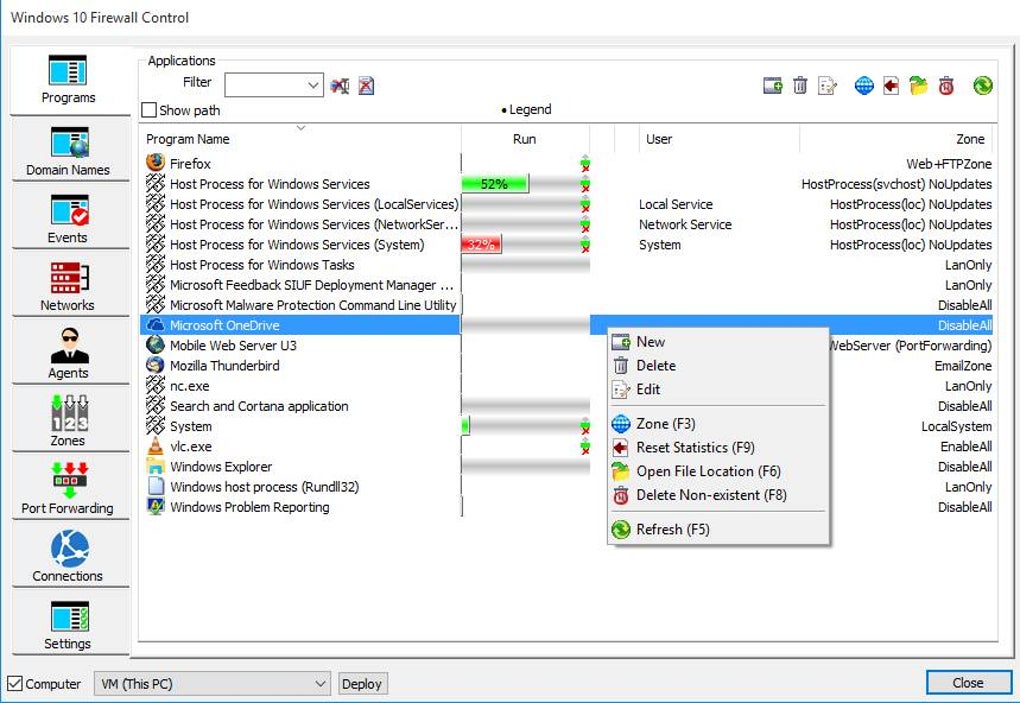
The user-friendly interface is another major advantage. Unlike the complex command-line tools or cryptic Windows Firewall settings, this app presents all options in a clean, visual layout. Tabs for active connections, firewall rules, and logs make navigation simple.
The software also supports quick rule creation, letting you block or allow apps with just a few clicks. For advanced users, there’s a custom rule editor that supports detailed configurations, including protocol selection (TCP/UDP), port ranges, and direction (inbound/outbound). Additionally, the tool includes automatic updates to ensure it remains compatible with new Windows updates and security patches.
This means you don’t have to manually check for new versions—updates are delivered seamlessly. Finally, lightweight performance ensures minimal CPU and memory usage, so your system runs smoothly even during intensive tasks. These features combine to make Windows 10 Firewall Control one of the most effective and accessible firewall tools available for Windows 10.
How to Install and Use Windows 10 Firewall Control
Getting started with Windows 10 Firewall Control is quick and straightforward. First, visit the official website of Sphinx Software and download the latest version of the tool. The installer is small in size and runs without requiring admin rights for basic installation—though some features may require elevated permissions. Once downloaded, run the installer and follow the on-screen prompts. The setup process typically takes less than a minute, and you’ll be prompted to choose your installation directory and create a desktop shortcut.
After installation, launch the application. The main dashboard appears immediately, displaying a list of active network connections, a summary of firewall rules, and a real-time traffic monitor. To begin managing your firewall, navigate to the Rules tab.
Here, you can view all existing rules, edit them, or create new ones. Clicking on any application in the connection list allows you to quickly block or allow it. For more advanced control, use the Rule Editor to specify exact conditions, such as blocking all outbound traffic from a specific program or allowing only certain ports.
One of the most useful features is the automatic rule suggestion. When an unknown program attempts to connect to the internet, the app prompts you to allow or block it. You can choose to apply the decision globally or for the current session.
This helps prevent malware from silently transmitting data. You can also export your rule set for backup or migration purposes. To keep your system secure, it’s recommended to check the Logs tab regularly and review any unusual activity.
The software also includes a system tray icon for quick access, allowing you to minimize it to the taskbar and still monitor activity. With its intuitive design and powerful tools, Windows 10 Firewall Control makes firewall management accessible to everyone.
Compatibility and System Requirements
Windows 10 Firewall Control is specifically designed for Windows 10, ensuring full compatibility with the latest operating system updates. It supports both 32-bit (x86) and 64-bit (x64) versions of Windows 10, making it accessible to a wide range of users. The software is lightweight and efficient, requiring minimal system resources—typically less than 50 MB of RAM and negligible CPU usage during idle periods. This ensures that it won’t slow down your computer, even on older or low-end machines.
While the tool is optimized for Windows 10, it also works seamlessly on Windows 11, thanks to its modern architecture and compatibility with newer system APIs. However, it is not available for macOS, Android, or iOS devices. If you’re using a Mac or mobile device, you’ll need to rely on alternative firewall solutions. The software is free to download and use, with no hidden costs or trial limitations. It does not require a license key or account registration, which enhances privacy and simplifies the user experience.
For users who rely on multiple devices, the lack of cross-platform support is a minor limitation. However, the focus on Windows 10 ensures deep integration with the OS, enabling features like seamless rule syncing and system-level monitoring. The developers regularly update the software to maintain compatibility with new Windows updates, security patches, and emerging threats. This ongoing support ensures that your firewall remains effective and up to date. Whether you’re using a desktop, laptop, or workstation, Windows 10 Firewall Control delivers consistent performance and reliability across all supported Windows 10 systems.
Pros and Cons of Windows 10 Firewall Control
- Pros:
- Free and open for personal and commercial use
- Intuitive, user-friendly interface for beginners and experts
- Real-time monitoring of incoming and outgoing connections
- Granular rule creation with support for custom ports and protocols
- Lightweight with minimal impact on system performance
- Regular updates to maintain compatibility and security
- Automatic rule suggestions for unknown applications
- No ads, no spyware, and no data collection
- Cons:
- Not available for macOS, Android, or iOS
- Limited to Windows 10 and Windows 11 (no support for older Windows versions)
- No built-in VPN or advanced threat detection features
- Advanced features require some technical knowledge
- Minimal customer support options (community-driven)
FAQ: Frequently Asked Questions
Is Windows 10 Firewall Control safe to download?
Yes, Windows 10 Firewall Control is safe to download and use. It is developed by Sphinx Software, a reputable company known for its privacy-focused tools. The software is free of malware, ads, and tracking scripts. It does not collect user data or send information to external servers. Always download from the official website to avoid third-party versions that may be tampered with.
Can I use Windows 10 Firewall Control on Windows 11?
Yes, Windows 10 Firewall Control is fully compatible with Windows 11. The developers have optimized the tool to work with the latest Windows updates, ensuring seamless performance and full functionality on both Windows 10 and Windows 11 systems.
Does Windows 10 Firewall Control block malware automatically?
No, it does not block malware automatically. However, it helps you detect suspicious connections by showing real-time network activity. If a program attempts to connect to the internet without your permission, you can block it immediately. This proactive approach helps prevent malware from exfiltrating data or downloading additional payloads.
Is there a mobile version for Android or iOS?
No, Windows 10 Firewall Control is currently only available for Windows 10 and Windows 11. There is no official version for Android, iOS, or macOS. Users on mobile devices should consider alternative firewall apps designed for their respective platforms.
How often is Windows 10 Firewall Control updated?
The software is updated regularly, typically every few months, to ensure compatibility with new Windows updates and to address any security vulnerabilities. Updates are delivered automatically through the installer, so users always have the latest version without manual intervention.
Final Verdict: Why You Should Download Windows 10 Firewall Control
Windows 10 Firewall Control is a must-have tool for anyone serious about securing their Windows 10 system. With its intuitive interface, real-time monitoring, and powerful rule management, it empowers users to take full control of their network activity. Whether you're protecting personal data, securing a home network, or managing a small business setup, this free software delivers professional-grade protection without the complexity. It’s lightweight, reliable, and continuously updated, making it a smart long-term investment in your digital safety.
While it lacks cross-platform support and advanced threat detection, its core functionality is unmatched in the free firewall space. If you're looking for a secure, efficient, and easy-to-use firewall tool for Windows, this is the best choice available. Download Windows 10 Firewall Control today and experience the peace of mind that comes with knowing your system is fully protected.
Download Now – Free, Secure, and Trusted Firewall Tool for Windows 10







